![Webinar Chat: The Complete Guide to Engaging Your Audience [2026]](/blog/content/images/size/w2000/2026/02/article-hero-webinar-chat.svg)
Your webinar just hit 500 attendees. The presenter is delivering valuable content. But the audience? Silent. Passive. Already checking email in another tab.
This is the engagement gap that webinar chat solves.
Webinar chat is a real-time messaging feature that allows participants, hosts, and speakers to exchange messages during a live or recorded webinar. It transforms passive viewers into active participants. According to industry research, 54% of attendees prefer chat-based Q&A over microphone Q&A, and webinars with active chat see 28% higher watch time.
But here is the problem most guides will not tell you: built-in webinar chat often fails at scale. It lacks customization. It cannot handle thousands of participants. And it forces you into one platform's limitations.
This guide covers everything you need to know about webinar chat — what it is, best practices for engagement, and how to add professional, scalable chat to any webinar platform using standalone tools like DeadSimpleChat.
TL;DR: Webinar chat is a real-time messaging feature that allows attendees, hosts, and speakers to communicate during live or recorded webinars. With 54% of attendees preferring chat-based Q&A and 28% higher watch time when chat is active, it has become essential for engagement. For large events or custom platforms, embeddable third-party chat tools like DeadSimpleChat provide scalability up to 10 million users, professional moderation tools, and easy integration via iframe.
What Is a Webinar Chat?
A webinar chat is a real-time communication tool that allows participants, hosts, and speakers to exchange messages during a live or recorded webinar. Unlike one-way video content, chat creates a two-way conversation that keeps attendees engaged throughout the session.
Chat serves a different purpose than Q&A features. While Q&A is structured — attendees submit questions that only the host sees — chat is an open forum where everyone can see and contribute to the conversation. This creates community and spontaneous interaction.
In most webinar interfaces, chat appears as a sidebar panel alongside the video stream. Attendees can type messages, react with emojis, and see responses in real-time.
The Three Types of Webinar Chat
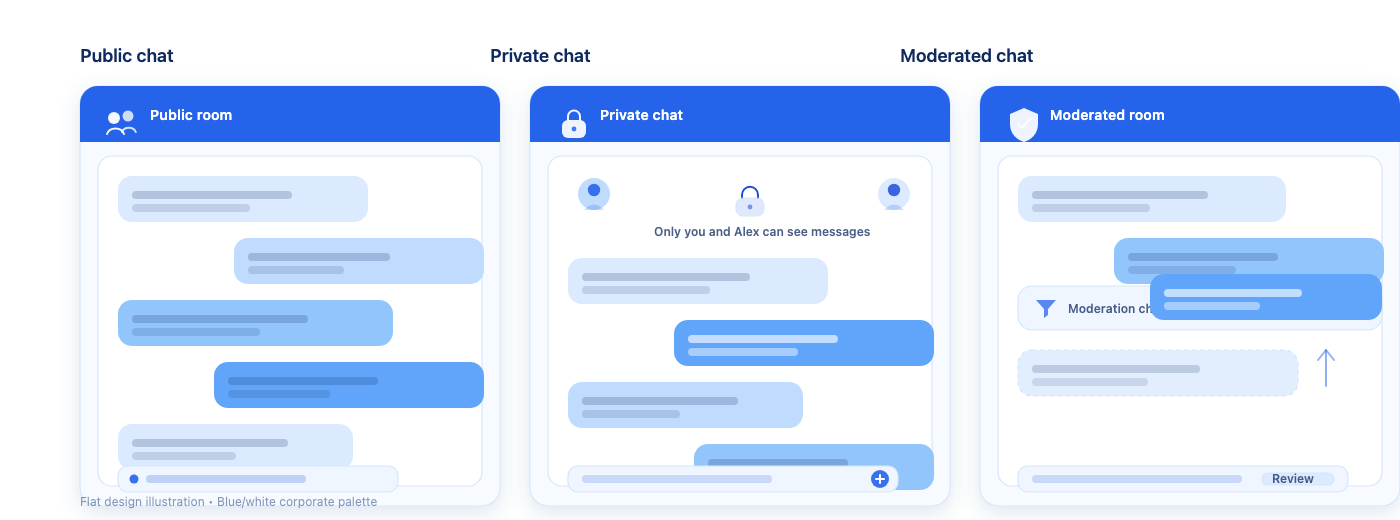
Not all webinar chat works the same way. Understanding the three types helps you choose the right configuration for your event.
| Chat Type | Visibility | Best For | Considerations |
|---|---|---|---|
| Public Chat | All attendees see all messages | Community building, informal events, smaller audiences | Can become chaotic at scale; requires active moderation |
| Private Chat | Only hosts and moderators see messages | Sales conversations, support questions, sensitive topics | Enables 1-on-1 engagement; attendees cannot see peer messages |
| Moderated Chat | Messages screened before display | Large events, professional settings, compliance requirements | Adds delay; ensures quality control; requires dedicated moderator |
Public chat works well for webinars under 200 attendees where you want community interaction. Private chat is ideal for sales-focused webinars where reps engage with prospects individually. Moderated chat suits large corporate events where message quality matters more than speed.
Why Webinar Chat Matters for Engagement
Webinar chat directly impacts whether attendees stay engaged or drift away. The data is clear.
According to ON24's 2025 Digital Engagement Benchmarks Report, 68% of webinar attendees interact through Q&As, polls, or chat. That same report shows a 51% year-over-year increase in live chat with sales teams during webinars. Attendees are not just willing to chat — they expect it.
The engagement benefits compound:
- 54% of attendees prefer chat-based Q&A over raising their hand or unmuting their microphone (Industry Reports, 2025-2026)
- 28% higher watch time when chat is active versus webinars with chat disabled
- 30% more likely to convert when attendees engage with chat during the session (Contrast, 2025)
These numbers matter because passive viewers do not convert. When someone types a message in chat, they become invested in the session. They are paying attention. They are more likely to remember your content and take action.
| Engagement Metric | With Active Chat | Without Chat | Source |
|---|---|---|---|
| Average watch time | 28% higher | Baseline | Industry Reports, 2025–2026 |
| Attendee interaction rate | 68% | <30% | ON24 Benchmarks, 2025 |
| Conversion likelihood | 30% higher | Baseline | Contrast Statistics, 2025 |
| Sales team chat engagement | 51% YoY increase | — | ON24 Benchmarks, 2025 |
The virtual events market reached $243 billion in 2025, according to Grand View Research. As webinars become a primary channel for B2B marketing and sales, chat is no longer optional — it is essential for competitive engagement.
Explore chat moderation features for your next webinar
Webinar Chat vs. Q&A: When to Use Each
Webinar chat is for open discussion; Q&A is for structured questions to presenters. Use both together for maximum engagement.
The difference matters more than most hosts realize. Chat creates community — attendees see each other's reactions, share insights, and build rapport. Q&A creates order — hosts control which questions surface and when they are answered.
For webinars under 500 attendees, enable both chat and Q&A. Let attendees react and discuss in chat while reserving Q&A for substantive questions you will answer on screen.
For webinars over 1,000 attendees, use moderated chat or private chat with Q&A. Open public chat becomes overwhelming at scale — messages scroll faster than anyone can read.
Some hosts disable chat entirely for training sessions requiring undivided attention. This is valid when content absorption matters more than interaction. But for most marketing, sales, and community webinars, chat significantly outperforms chat-free sessions.
Key Features to Look for in Webinar Chat
When evaluating webinar chat tools — whether built-in or standalone — these features determine whether chat will enhance or undermine your event.
Real-time messaging with low latency is non-negotiable. Messages should appear within milliseconds. Noticeable delay breaks the conversational flow and frustrates attendees.
Moderation tools protect your event from spam, trolling, and off-topic messages. Our complete guide to chat moderation covers this in depth. Look for:
- Ban and mute individual users
- Delete messages in real-time
- Word filters for profanity and spam
- AI-powered content moderation for images
- Multiple moderator roles for large events
Scalability determines whether chat works at 100 attendees or collapses at 1,000. In our experience supporting webinars with thousands of attendees, we have seen built-in platform chat struggle when events exceed a few hundred participants. Messages lag, the interface freezes, and engagement drops.
Embedding capability matters if you host webinars on custom landing pages, YouTube Live, Vimeo, or other platforms without native chat. Embeddable chat — like DeadSimpleChat — lets you add professional chat to any page with a single line of code.
SSO (Single Sign-On) automatically authenticates users from your existing platform. When attendees log into your webinar, they are already logged into chat with their name and profile. No friction. No anonymous trolls.
White-label branding removes third-party logos and matches chat to your brand. For enterprise webinars, this professionalism matters.
Additional features to consider:
- File and media sharing
- Language translation for international audiences
- Chat analytics and export
- API/SDK access for custom integrations
- Private messaging between attendees and hosts
Webinar Chat Feature Checklist
View DeadSimpleChat pricing for events
Webinar Chat Best Practices
Great webinar chat does not happen by accident. These practices — refined from supporting thousands of webinar sessions — maximize engagement and minimize chaos.
Set clear chat rules upfront. Display guidelines at the start: "Keep discussion on-topic. Be respectful. Questions for the speaker go in Q&A." This prevents confusion and sets expectations.
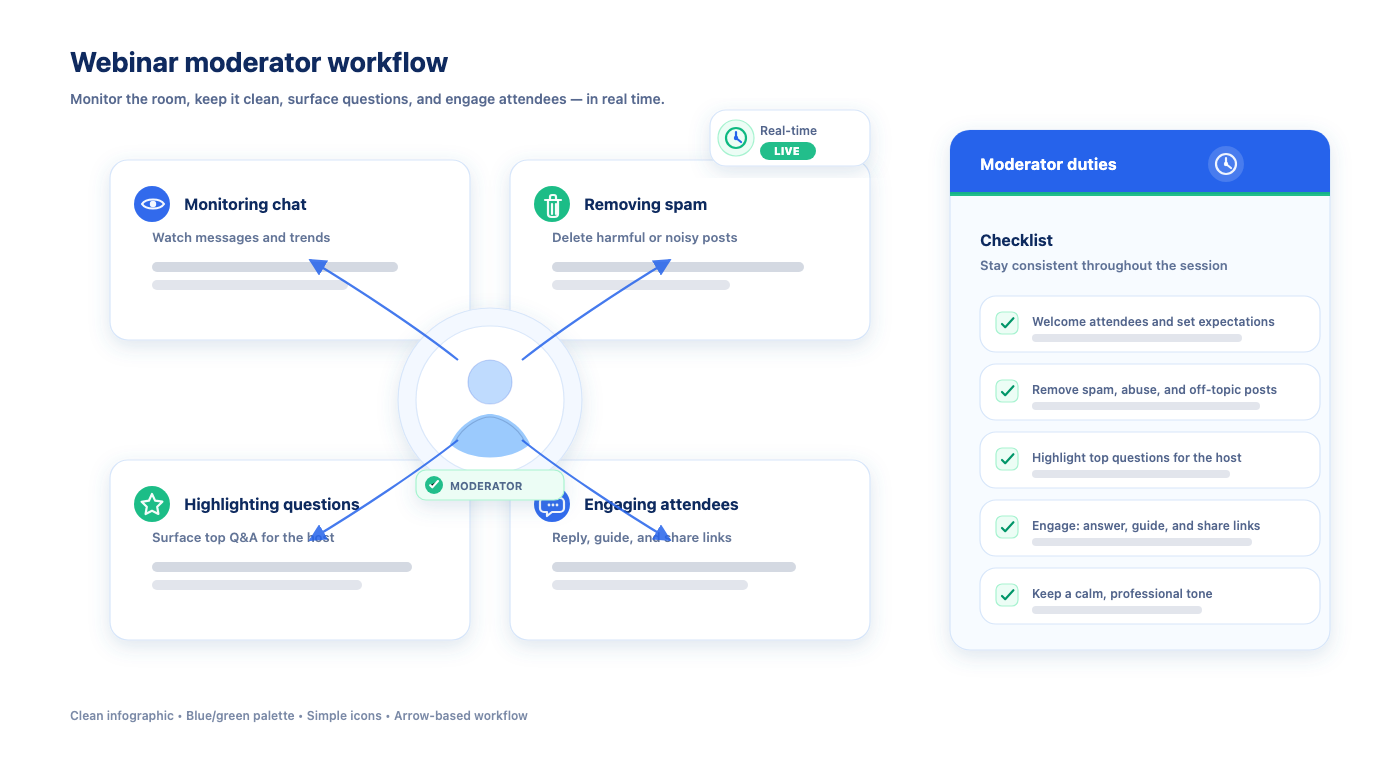
Assign a dedicated moderator. The presenter cannot watch chat and deliver content simultaneously. A dedicated moderator monitors messages, removes spam, highlights good questions, and keeps the conversation flowing.
Start with an icebreaker question. Ask attendees to share where they are joining from or what they hope to learn. This breaks the silence and establishes that chat is active.
Use open-ended questions throughout. Pause every 10-15 minutes to ask the audience a question: "What is your biggest challenge with [topic]?" This keeps attendees engaged and generates valuable insights.
Acknowledge contributions from chat. When the presenter mentions a comment by name — "Great point, Sarah" — other attendees feel motivated to participate. Recognition drives engagement.
Handle negative messages professionally. Delete truly disruptive content. For critical but legitimate feedback, acknowledge it briefly and move on. Never engage in arguments in chat.
Use chat alongside polls and Q&A. Chat captures informal reactions. Polls capture structured data. Q&A captures substantive questions. Together, they create a rich engagement ecosystem.
Review chat data after the webinar. Export the chat log and analyze it. What questions came up repeatedly? What topics generated the most discussion? This informs future content.
How to Add Chat to Any Webinar Platform
Here is what most webinar guides will not tell you: you are not limited to your platform's built-in chat.
When webinar organizers hit the limitations of built-in chat — scalability issues, lack of customization, no SSO, weak moderation — the solution is embedding a standalone chat tool. This works with YouTube Live, Vimeo, custom landing pages, and even alongside Zoom or GoToWebinar for simulcast pages.
Why Built-In Webinar Chat Falls Short
In our experience working with webinar organizers, four pain points consistently drive the search for alternatives:
- Scalability failures. Built-in chat cannot accommodate all participants. Messages lag, the interface freezes, or chat is disabled entirely for large events.
- No customization. The chat looks like the platform's chat, not your brand. Colors, fonts, and styling cannot be changed to match your webinar page or website design.
- No seamless authentication. Webinar organizers want participants to automatically join chat when they log into the webinar. Without SSO, attendees must create separate accounts or join anonymously.
- Weak moderation. Basic mute and delete functions are insufficient for large events. No AI moderation. No word filters. No multiple moderator roles.
Embedding DeadSimpleChat on Your Webinar Page
Adding standalone chat to any webinar takes under five minutes:
Step 1: Create a free account at DeadSimpleChat
Step 2: Create a chat room for your webinar
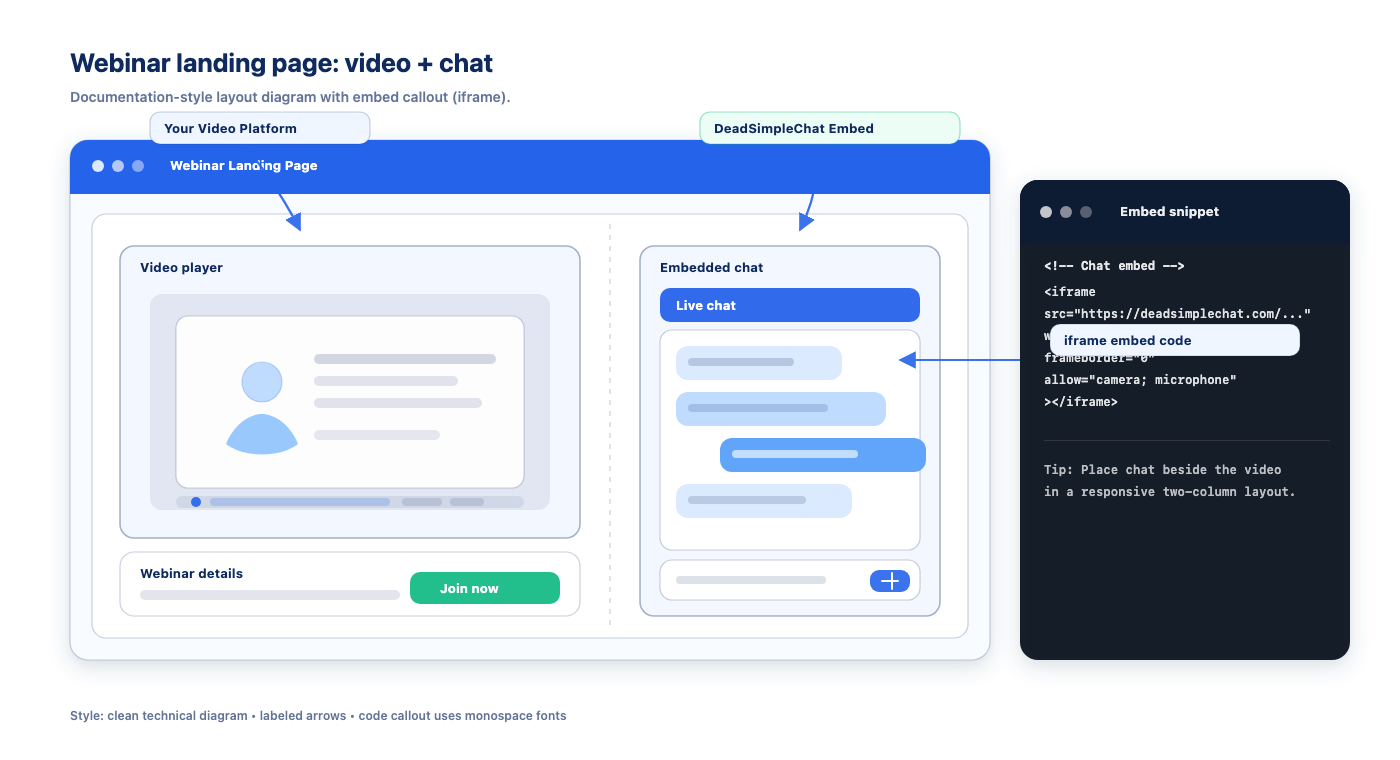
Step 3: Copy the embed code (a single iframe line)
Step 4: Paste the code into your webinar page HTML alongside your video stream
Step 5: Configure SSO to auto-authenticate attendees from your webinar registration
The chat appears alongside your video content. Attendees interact in real-time while watching. You control moderation, branding, and settings independent of your video platform.
When Standalone Chat Makes Sense
Use standalone embeddable chat when:
- Your audience exceeds 500 attendees and built-in chat cannot keep up
- You host webinars on YouTube Live, Vimeo, or custom pages without native chat
- Your brand requires white-label chat that matches your design
- You need SSO to auto-authenticate participants
- Sales reps need private 1-on-1 chat with prospects during the webinar
- Multiple moderators need simultaneous access with different permission levels
Built-in platform chat works well for webinars under 500 attendees with basic needs. For anything larger or more customized, embeddable chat is the professional solution.
Try DeadSimpleChat free for your next webinar
Scaling Webinar Chat for Large Audiences
At 100 attendees, any chat works. At 1,000 attendees, most chat breaks down. At 10,000+, you need infrastructure built for scale.
The challenge with large-audience chat is threefold:
Message volume overwhelms readers. When hundreds of people type simultaneously, messages scroll faster than anyone can read. Valuable comments disappear in seconds.
Moderation becomes impossible. A single moderator cannot review 50+ messages per minute. Spam and trolling slip through.
Infrastructure fails under load. Built-in webinar chat was not designed for thousands of concurrent connections. Latency increases. Messages drop. The experience degrades.
How DeadSimpleChat Handles Scale
DeadSimpleChat infrastructure supports up to 10 million concurrent users with an average response time of 5ms. This is not theoretical — enterprise customers like ESPN and Duolingo rely on this scale for live events with massive audiences.
The platform maintains 100% server uptime during high-traffic events. When your webinar hits peak attendance, chat performance stays consistent.
Tips for Managing High-Volume Chat
Even with scalable infrastructure, large events need strategic moderation:
Use moderated chat mode. Messages are screened before display. This slows the pace, improves quality, and makes the chat readable.
Assign multiple moderators. For events over 1,000 attendees, one moderator is insufficient. Distribute the workload across 2-3 people with clear role assignments.
Enable AI-powered filtering. Automated content moderation catches spam, profanity, and inappropriate images before they reach the audience. This reduces moderator burden dramatically.
Consider private chat for sales. Instead of public chat chaos, enable private 1-on-1 messaging between sales reps and attendees. Our customers use this for direct prospect engagement during webinars without the noise of public chat.
Rate limit if necessary. Some platforms allow limiting how frequently users can post. This prevents spam floods and keeps conversation manageable.
Learn about chat for live events
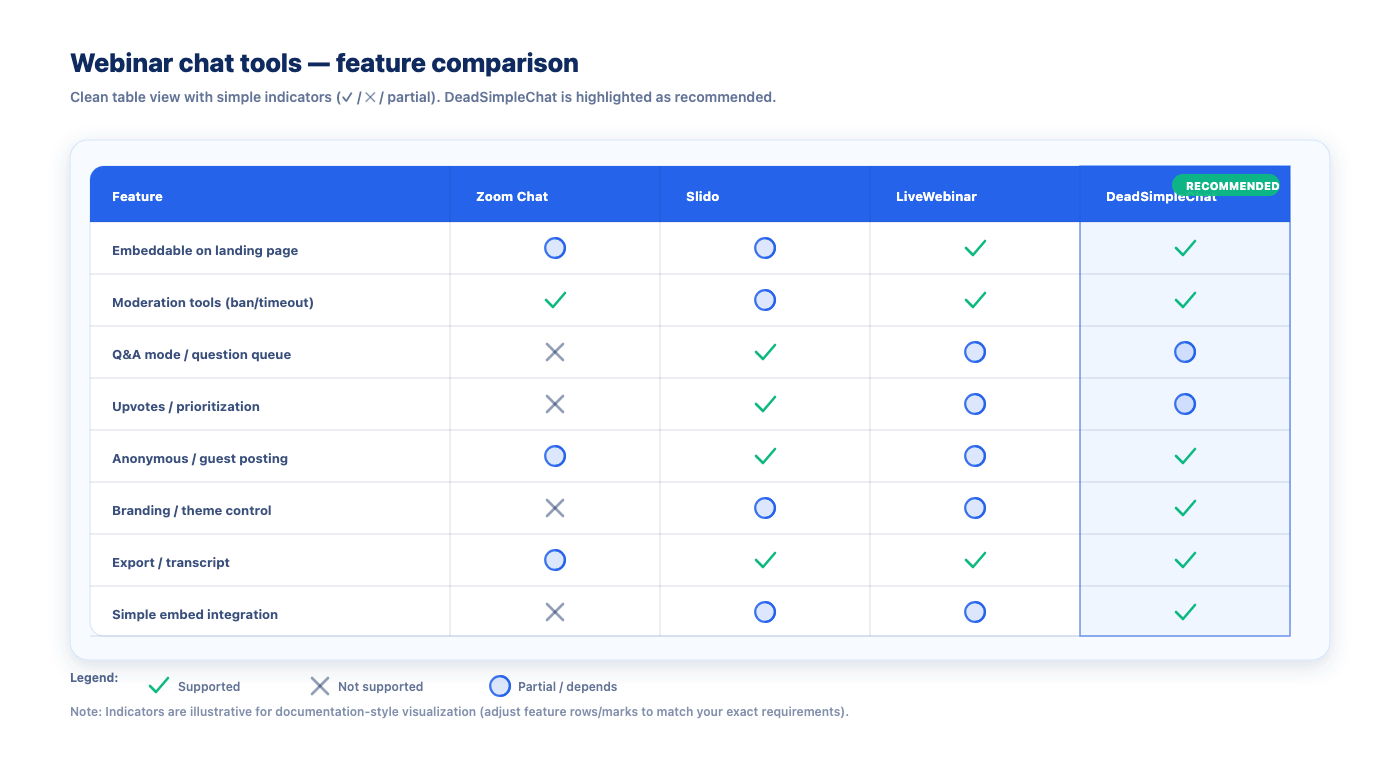
Webinar Chat Tools Compared
The right chat tool depends on your webinar format, audience size, and customization needs.
Built-In Platform Chat (Zoom, GoToWebinar, Webex)
Built-in chat comes free with your webinar platform. For small events (under 500 attendees) with basic needs, it works adequately.
Pros: No additional setup, integrated with video, familiar interface
Cons: Limited customization, scalability issues at large sizes, basic moderation tools, no embedding for custom pages, no SSO with external systems
Zoom Webinars, for example, can accommodate up to 1 million attendees with expanded licensing (Zoom, 2025). But Zoom's chat is tied to their platform — you cannot embed it on a custom landing page.
Slido
Slido focuses on polls and Q&A rather than open chat. It integrates with major webinar platforms.
Pros: Excellent polling features, good Q&A management, integrations
Cons: Not designed for real-time open chat, limited scalability for chat use case
LiveWebinar
A full webinar platform with built-in chat, including emoticons, translation, and file sharing.
Pros: All-in-one platform, good feature set
Cons: Requires switching platforms entirely, chat tied to their system
DeadSimpleChat
A standalone, embeddable chat solution that works with any webinar platform or custom page.
Pros:
- Embeds on any website or webinar page via iframe
- Scales to 10 million concurrent users
- Full moderation suite (ban, filter, AI moderation, multiple moderators)
- SSO for automatic user authentication
- White-label branding
- 5ms average response time
- Works alongside YouTube Live, Vimeo, Zoom simulcasts, custom pages
Cons: Requires separate setup (though minimal — under 5 minutes)
For organizations that need chat flexibility beyond their webinar platform's built-in options, DeadSimpleChat offers the most versatile solution.
Frequently Asked Questions
What is a webinar chat?
A webinar chat is a real-time messaging feature that enables participants, hosts, and speakers to communicate during a live or recorded webinar. Unlike Q&A sessions that focus on structured questions to presenters, chat allows open discussion among all attendees, fostering community and engagement. There are three main types: public chat visible to everyone, private chat between hosts and individuals, and moderated chat where messages are screened before appearing publicly.
What is the difference between webinar chat and Q&A?
Webinar chat is an open discussion forum where all attendees can see and contribute messages in real-time, promoting community interaction. Q&A is a structured feature where attendees submit questions that only the host sees, who then selects which to answer publicly. Chat creates informal engagement and community; Q&A provides organized presenter control. Best practice is using both together: chat for reactions and discussion, Q&A for substantive questions.
How do you moderate webinar chat effectively?
Effective webinar chat moderation requires three phases. Before the webinar, establish clear chat guidelines and assign a dedicated moderator separate from the presenter. During the event, monitor for spam, trolling, and off-topic messages while highlighting valuable contributions. After the webinar, review chat logs to identify recurring questions and improve future sessions. For events over 1,000 attendees, assign multiple moderators and enable AI-powered content filtering.
Should webinar chat be enabled or disabled?
Enable chat when audience engagement, community building, and real-time feedback are priorities. Webinars with chat see 28% higher watch time and attendees feel like active participants rather than passive viewers. Disable chat for training sessions requiring undivided attention, or for very large audiences where messages become overwhelming. A middle approach: use moderated chat that screens messages before display, maintaining quality without losing interaction.
What features should a webinar chat tool have?
Essential webinar chat features include: real-time messaging with minimal latency, moderation tools (ban, delete, word filters), scalability for large audiences, and embedding capability for custom platforms. Advanced features include SSO for automatic user authentication, white-label branding, file and media sharing, language translation, chat analytics and export, and API/SDK access. For enterprise events, look for 10 million+ concurrent user capacity and dedicated moderator roles.
Can you add third-party chat to a webinar platform?
Yes, you can embed standalone chat tools like DeadSimpleChat on any webinar platform or custom streaming page using an iframe or JavaScript snippet. This is valuable when built-in platform chat lacks customization, cannot scale to thousands of participants, or does not support SSO. Third-party chat works alongside YouTube Live, Vimeo, custom landing pages, and simulcast pages. The embed takes under five minutes and requires no backend infrastructure from your team.
How does webinar chat scale for large audiences?
Most built-in webinar chats become chaotic with 500+ participants as messages flood faster than anyone can read. Scaling requires rate limiting to prevent spam, multiple moderator roles to distribute workload, AI-powered content filtering for real-time moderation, and infrastructure designed for millions of concurrent users. DeadSimpleChat supports up to 10 million concurrent users with 5ms response times, maintaining 99.99% uptime during high-traffic events.
Getting Started with Webinar Chat
Webinar chat transforms passive viewers into active participants. The data supports it: 54% of attendees prefer chat-based interaction, and active chat drives 28% higher watch time.
For webinars under 500 attendees with basic needs, built-in platform chat works adequately. You get chat functionality without additional setup.
For larger events, custom branding requirements, or hosting on platforms without native chat, standalone embeddable solutions like DeadSimpleChat provide the scalability, customization, and moderation tools that built-in chat lacks.
The choice comes down to your specific needs:
- Basic needs, small audience: Use built-in platform chat
- Custom pages, YouTube Live, Vimeo: Embed standalone chat
- Large events (500+ attendees): Use scalable chat with moderation tools
- Enterprise requirements (SSO, white-label): Use professional embeddable chat
Whatever you choose, enable chat. The engagement difference is measurable and significant.
Add chat to your webinar in 5 minutes — start free
About DeadSimpleChat: DeadSimpleChat specializes in embeddable real-time chat solutions for webinars, live events, and online communities. Trusted by enterprise customers including ESPN and Duolingo, the platform supports up to 10 million concurrent users with 5ms response times and 99.99% uptime. With comprehensive moderation tools, SSO integration, and white-label options, DeadSimpleChat powers engagement for events of all sizes.
Ready to Add Chat to Your Website?
Get started for free. No credit card required.
Start a Free Trial