Private Chat (1-1 Chat)
A private chat is a conversation between two people in the same chat room, running alongside the group conversation. It opens in its own window, only the two of them can see it, and it has its own history.
Two settings control it, and they are both on the room's General tab: 1-1 Chat (Private Chat) turns the feature on, and Moderator only decides who is allowed to start a conversation.
Turning it on
Open the Dead Simple Chat dashboard, go to Chat Rooms, select a room, and stay on the General tab. Switch on 1-1 Chat (Private Chat).
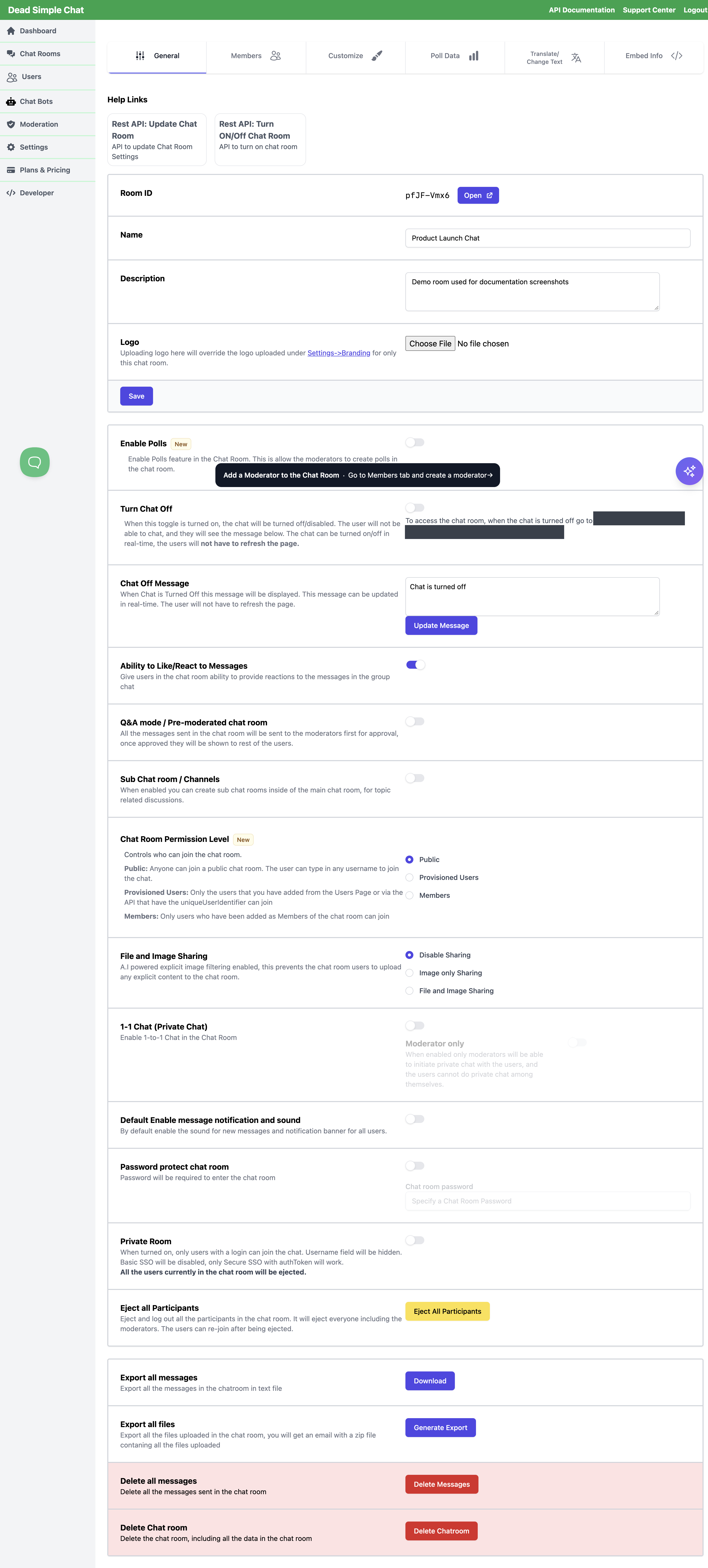
The switch saves itself — there is no Save button on this part of the tab. A new room has it off.
Underneath it sits Moderator only, dimmed until 1-1 Chat (Private Chat) is on.
| Both settings | What people in the room can do |
|---|---|
| 1-1 Chat off | Nothing. There is no Private Chats section in the sidebar and no way to open a private conversation. |
| 1-1 Chat on, Moderator only off | Anyone in the room can start a private chat with anyone else in it. |
| 1-1 Chat on, Moderator only on | Only moderators can start one. A participant cannot start a private chat with another participant, but can reply in a conversation a moderator has started with them. |
Moderator only is what makes a support desk out of a public room: people get a private line to your staff without getting a private line to each other. Leave it off for a community room, an event lounge or anywhere the point is for participants to talk to one another.
Starting a conversation
Select someone's username — either in the Online users list in the sidebar, or on any message they have sent, in the main conversation or in a channel. Their conversation window opens straight away, titled with their username, and the conversation appears in both people's Private Chats list.
- You cannot start one with yourself — selecting your own name does nothing.
- Selecting the name of someone you already have a conversation with reopens the one you have rather than starting a second. If either of you had archived it, it comes back for both of you.
- With Moderator only on, selecting a name does nothing unless you are a moderator.
Moderators have a second route. The Moderation Dashboard has a DM button on each participant's row, which opens the same conversation from outside the room — useful when you are watching a room you have not joined.
What the other person sees
Once a conversation exists, the person on the other end gets:
- A Private Chats section in the sidebar, above the online users list, listing the other person's username. Selecting it opens the conversation.
- An unread badge beside that name when a message arrives while the window is closed, and on the menu button on a narrow screen.
- A sound, and a desktop notification if their browser tab is in the background. Unlike a message in a channel they are not looking at, a private message does raise the notification. The bell in the sidebar silences both, and Default Enable message notification and sound on the General tab decides which way that starts out.
- A conversation window with the history, the other person's name and picture on each message, Markdown formatting, a typing indicator, and an attachment button if the room allows file and image sharing. Uploads in a private chat follow the same room setting as uploads in the group chat.
They can archive a conversation with the small x beside the name and confirming Archive Conversation. That removes it from their own list only — the other person still has it, and a new message or a fresh start brings it back for both of them, with the history intact.
The Private Chats list is the only way back into a conversation whose window has been closed. Hiding the sidebar takes private chat away from the people in the room; use Collapse Sidebar instead when you want the space. See the Hide Elements Reference.
The Private Chats heading and the unread badge can be relabelled from the room's
Translate/Change Text tab, or with the privateChats and unread keys on
loadTranslation.
Moderator direct messages when private chat is off
A direct message a moderator sends from the Moderation Dashboard is not readable in the room while 1-1 Chat (Private Chat) is off. The dashboard accepts the message and saves it to the conversation, so nothing is lost — but the participant's chat has no Private Chats section to show it in, and it does not carry private-chat messages while the setting is off. The DM window gives no warning, so it looks like it was delivered.
To make those conversations readable, switch 1-1 Chat (Private Chat) on for the room. Turn Moderator only on at the same time if you want moderators to be the only ones who can start a conversation — that combination gives you moderator-to-participant DMs without opening private chat between participants. Anything already stored appears in the participant's Private Chats list the next time their chat loads.
Private chat from the SDK
The SDK works the same way the sidebar does: get a user id, create the conversation, then send into it.
const sdk = new DSChatSDK("<roomId>", "chat-frame", "<public_key>");
await sdk.connect();

// A conversation needs the other person's user id
const { onlineUsers } = await sdk.getOnlineUsers();

sdk.on("conversationCreated", (conversation) => {
  sdk.sendPrivateMessage("Hello — how can we help?", conversation._id);
});

sdk.createConversation(onlineUsers[0]._id);
| Method | What it does |
|---|---|
createConversation | Starts (or reopens) a conversation with a user id. Subject to the same rules as the sidebar: it does nothing while 1-1 chat is off, or while Moderator only is on and the viewer is not a moderator. |
sendPrivateMessage | Sends into a conversation you have the id of. Up to 500 characters. |
getActiveConversations | Lists the viewer's conversations, with both members of each. |
openConversation | Opens the conversation window, as selecting the name in the sidebar does. |
getOnlineUsers | The user ids to start conversations with. |
| Event | When it fires |
|---|---|
conversationCreated | A conversation involving the viewer is created. Fires for both people, and carries memberOne and memberTwo. |
conversationMessage | A private message arrives, with conversation, message and the sending user. |
conversationCreated is how you learn the conversationId that
sendPrivateMessage and
openConversation need, so subscribe before you call
createConversation.
Private chat through the REST API
| What you want | Endpoint |
|---|---|
| Turn the setting on or off | Create Chat Room and Update Chat Room, fields enableOneToOneChat and moderatorOnlyOneToOneChat, values "on" and "off" |
| List a room's private conversations | Get Chat Room Conversations |
| Read one conversation's messages | Get Chat Room Conversation Messages |
moderatorOnlyOneToOneChat can be set while enableOneToOneChat is off — the value is stored and takes
effect when private chat is turned on. Both fields come back from
Get a Chat Room, so you can confirm what a room is set to.
Webhooks
If you use webhooks, a new conversation raises private_message_initiated and
private messages raise new_private_message. private_message_initiated is delivered by the same
switch as channel_created, so turning on channel events gets you both — see
Webhook events. Direct messages sent from the Moderation Dashboard do not raise
webhooks.
Related
- Chat Room Settings Reference — every other control on the General tab.
- Moderation Dashboard — the DM button, and moderating a room without joining it.
- Creating Moderators — you need a moderator before Moderator only means anything.
- File and Image Sharing — what can be attached to a private message.
- Channels and Sub-Rooms — the other conversation type in the sidebar.
- Hide Elements Reference — what hiding the sidebar does to private chat.